
Python Virtual Environments#
Virtual environments are isolated Python environments that allow you install and manage Python packages separately from your system’s global Python installation. Additionally, they enable developers to create an isolated environment for each project, ensuring that dependencies do not conflict with one another. Without virtual environments, installing and managing dependencies can lead to conflicts and compatibility issues both for the system as a whole as well as for different projects.
While several alternatives exist for managing virtual environments, our recomendation is to use venv and pip. venv is part of the Python Standard Libray while pip is the standard tool to install packages from PyPI, the standard/default location for Python packages. Both of these tools have been included with Python by default since Python 3.3. venv is lightweight and straightforward to use - providing essential functionality for creating isolated environments without unnecessary complexity.
Creating a Virtual Environment#
To create a virtual environment using venv, open a terminal or command prompt and navigate to your project directory. Then, execute the following command:
python3 -m venv <env_name>
Replace <env_name> with the desired name for your virtual environment. While you can choose your own name, we
recommend using “venv”. The official docs.python.org’s tutorial on venv suggests using .venv as the name
within the rationale that the name keeps the directory typically hidden in your shell and thus out of the way while giving it a name that explains why the directory exists. However, hiding the directory can also be problematic. From our perspective,
the visibility of seeing the folder with default directory listings is an advantage.
Note
Replace python3 with the appropriate version of Python installed as part of this guide’s preliminaries. You may also need to change this in other commands on this page.
Activating the Virtual Environment#
After creating the virtual environment, you need to activate it. Activation sets up the appropriate environment variables so that when you use pip to install packages, they are installed within the virtual environment.
source <env_name>/bin/activate
Once you have activated the environment can use python, python3, or python3.12 to execute the interpreter.
You will also see the command prompt:
(<env_name>) user@machine directory %
You must activate the virtual environment every time you open a new terminal session when working on your class work/project.
First Activation#
As soon as you activate a virtual environment for the first time, you should also upgrade pip and install two support tools: setuptools and wheel. setuptools facilitates the installation of Python packages by providing tools and utilities for packaging, distributing, and installing Python software. Some Python packages may require features in this package. wheel provides capabilities for binary installations of Python packages, reducing the need to compile during installation.
pip install --upgrade pip setuptools wheel
...
Successfully installed pip-24.0 setuptools-69.5.1 wheel-0.43.0
Deactivating the Virtual Environment#
To deactivate the virtual environment and return to the global Python environment, execute the following command:
deactivate
Version Control System (Git) Considerations#
When using a version control system (e.g., git), add the virtual environment directory to
the “ignore” file for the system. For git, this is the.gitignore file. Add venv/** to the file by executing
this command in the same directory in which your virtual environment directory resides: (replacing <env_name> with the
name of your virtual environment.)
echo "<env_name>/**" >> .gitignore
git add .gitignore
git commit -m "Updated .gitignore to exclude virtual environment from git repository"
Follow this best practice for a number of reasons:
Virtual environments contain environment-specific files and directories, such as installed packages, cached files, and interpreter settings. These files are not essential to the project’s source code and may vary between developers or environments. Including the virtual environment directory in .gitignore prevents these environment-specific files from being inadvertently versioned, reducing repository bloat and potential conflicts.
Excluding the virtual environment from version control ensures that the repository focuses on the project’s source code and essential configuration files. This improves repository clarity and maintainability by keeping irrelevant files out of version history.
Facilitates reproducible builds, by having developers specify project dependencies in a configuration file such as requirements.txt or pyproject.toml.
Installing packages#
With the virtual environment active, you can install packages using pip. For example, to install the requests package, execute:
pip install requests
This installs the requests package within the virtual environment, keeping it isolated from your system-wide Python installation or other projects.
While typically not necessary, you can install specific version of a package with pip. Just follow the package name with == and the version number. The following installs version 1.3.2 of package_name.
pip install package_name=1.3.2
You can use comparison operators such as >= or <= to specify a range of versions for that package that pip will use to select for installation.
pip install package_name>=1.3.2
pip install package_name<=2.1.0
You can also use the ~= operator to specify a range of compatible versions. The following installs any version
of package_name that is compatible with version 3.0:
pip install package_name~=3.0
Tracking Packages#
You should track the necessary packages installed for a virtual environment in a file. Typically, for venv/pip a file
named requirements.txt is used for this purpose. (Technically, the filename does not matter, but by
convention most developers use requirements.txt.
This file lists all the dependencies of your project along with their versions. This file is crucial for replicating the environment on another machine or for deployment. You can use any text editor to create and maintain this file.
As of the time of writing this paragraph, the requirements.txt file had the following contents: (cat display a file’s contents.)
% cat requirements.txt
seaborn
google
scikit-learn
certifi
pendulum
arrow
chardet
jupyterlab
coverage
pyaml
jupyter-book
To add a single package to the file:
echo package_name >> requirements.txt
To install all of the dependencies from a requirements.txt, navigate to your project directory, activate the virtual environment, and execute:
pip install -r requirements.txt
To remove/uninstall a package, activate the environment and execute:
pip uninstall package_name
To list all of the currently installed packages for the activated virtual environment, execute
pip freeze
If you execute this within the virtual environment for this guide, you’ll see that there’s over 170 packages
installed despite approxiametely the dozen packages listed in requirements.txt. For instance, seaborn brings in
pandas, numpy, matplotlib, and several other essential libraries that it uses.
You can also utilize pip freeze to create a requirements.txt file:
pip freeze > requirements.txt
The resulting file contains all of the packages installed with their corresponding versions. This would allow you to replicate the environment exactly if needed.
Software Supply-Chain Security#
Software supply chain security refers to the practices and measures taken to secure the entire lifecycle of software development, from sourcing third-party components and dependencies to the final deployment and maintenance of the software. Some of the top risks in software supply chain security include:
Vulnerabilities in third-party components and open-source libraries
Insider threats and unauthorized code modifications
Compromised build environments and toolchains
Lack of visibility into software dependencies (software bill of materials)
Lack of secure coding practices and security testing
One recent example with open-source libraries is xz Utils backdoor in April, 2024. xz utils provides functionality to compress and decompress data and is ubiquitous in Linux. Overtime, an attacker gained trust and then carefully implanted a backdoor into the software component. Another widely known security vulnerability was Apache Log4j. One of the largest impacts in the financial industry was when Equifax experienced a significant data breach in 2017 through a known vulnerability in Apache Struts. Over 147 million sensitive consumer records were exposed. Equifax has paid over $575 million in settlement agreements. Wikipedia Article
Some of the best practices to mitigate these attacks include:
Vet and continuously monitor third-party components and open-source libraries for vulnerabilities
Implement secure coding practices, security testing, and code reviews throughout the development lifecycle
Maintain a software bill of materials (SBOM) for each software package and limit dependencies
Secure the build environment, toolchains, and code repositories with access controls and integrity checks
Educate and train development teams on supply chain security risks and best practices
As you decide when to bring in an open-source package/project, several considerations exist:
Functionality: Ensuring the package meets your project’s needs.
Community: Evaluate both the size of the open-source project’s community (i.e., the number and activity level of the developers) as well as the project’s users. Do developers respond to issues? When was the most recent update? In how many other projects is it used?
Dependencies: Investigate the dependencies of the open-source package to understand its potential impact on your project’s ecosystem. Within a project’s repository on Github, you can look at the requirements.txt file or the pyproject.toml file. As you investigate the dependencies in these files, realize that those dependencies will include additional dependencies.
Licensing: Ensure that the open-source package’s license is compatible with your project’s licensing requirements. Some licenses may restrict how the software can be used or distributed, which may not align with your project’s goals.
Security: Assess the open-source package’s security posture by reviewing its security history, known vulnerabilities, and how quickly security patches are released and adopted by the community.
You should regularly monitor the dependencies in your project for known vulnerabilities by using software component analysis tools. A couple of Python tools include -
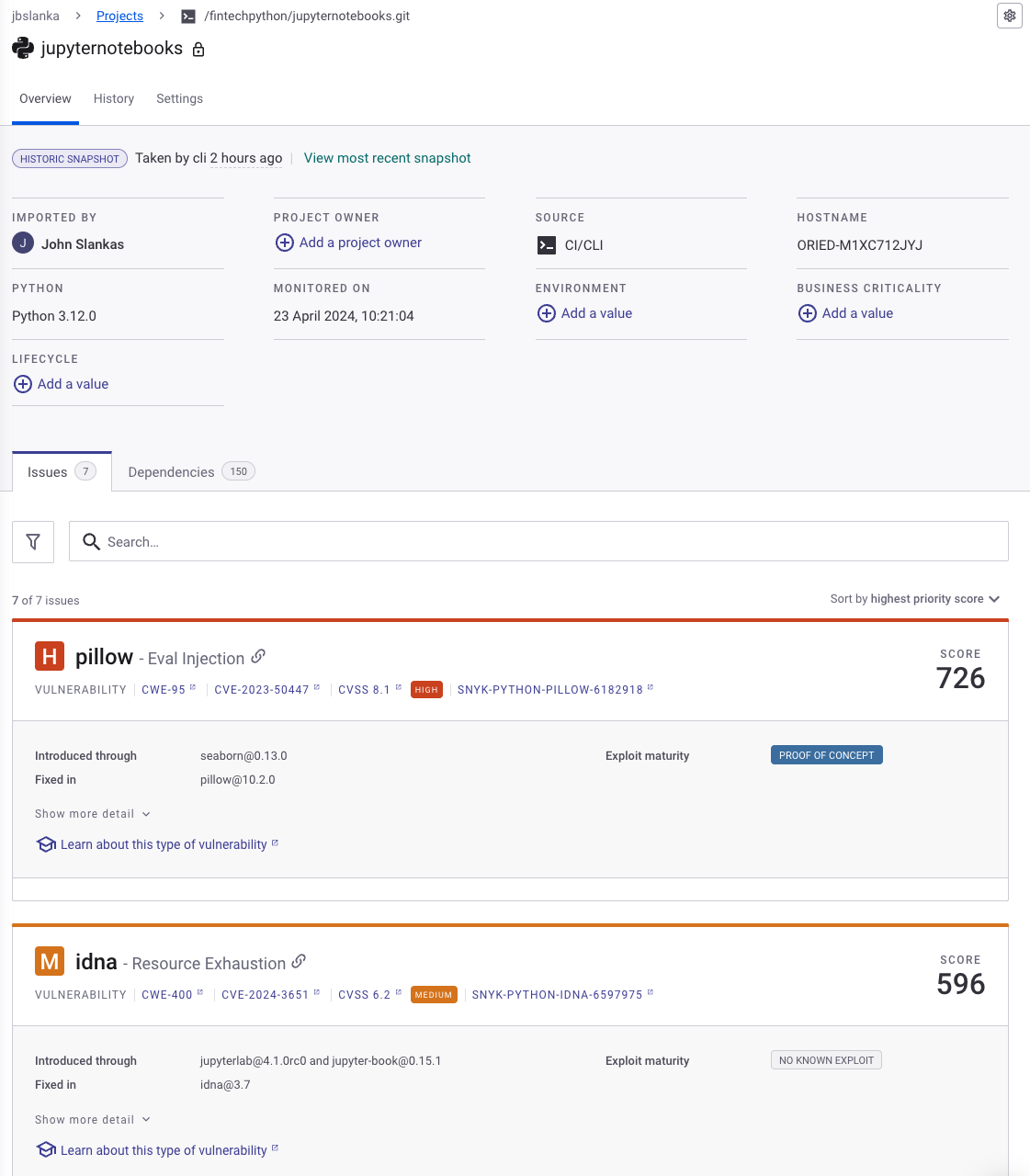
While both of these are commercial offerings and do require registration, they do offer free plans. The figure below shows the snyk results
of this project’s virtual environment prior to an upgrade:
For more details and a broad overview of this subject, read this page: https://www.gitguardian.com/learning-center/software-supply-chain-security
venv Alternatives#
While for the FinTech program, the venv/pip combination should suffice, circumstances may warrant the use of other tools for environment management, package management, building, and deployment.
Conda#
Conda is a popular package manager and environment manager for installing, running, and managing software packages and dependencies in various programming languages such as Python and R. Conda is an appropriate choice when you need to manage multiple versions of Python or need to integrate with external software packages such as CUDA.
If you are just using a specific version of Python and installing packages, the overhead of Conda may not be necessary.
Note
We explicitly recommend not using Anaconda. By default, over 250 packages are installed into the environment. This makes is difficult to determine which packages are actually in use by a project as well as possible conflict/compatibility issues if new packages need to be added.
Rather, you should explicitly start with an empty environment and add the packages required for the current project.
poetry#
Poetry is a popular Python packaging and dependency management tool that aims to simplify the process of building, packaging, and distributing Python applications and libraries. We do recommend using Poetry due to the packaging and build management capabilities.
virtualenv#
virtualenv is another alternative for creating virtual environments for Python. However, given the declining use of Python 2, virtualenv does not provide any solid advantages over just using venv.
pyenv#
pyenv allows you to manage and install different versions of Python. It does not require Python to be installed.
pipenv#
Pipenv is yet another package manager that attempts to “bridge the gaps between pip, python (using system python, pyenv or asdf) and virtualenv”. Looking at sites such as reddit, many posters suggest avoiding it.
Additional Resources#
Summary#
Virtual environments, coupled with venv and pip, are indispensable tools for Python developers. They streamline dependency management, ensure project isolation, and enhance portability. By mastering these tools and practices, you can maintain clean, organized, and reproducible Python projects.